Github Jekyll 101 in mac
사용된 스텍
- rbenv: 다수의 ruby 버전을 관리해주는 패키지
- ruby: jekyll는 ruby gem이므로, ruby가 반드시 필요함
- jekyll: Github의 페이지를 작동시켜주는 정적 사이트 생성기
- bundler: ruby의 application dependency를 관리해주는 패키지
Jekyll를 사용하여 Github에 blog를 만들어본다
Make new github repository for blog
- 되도록이면
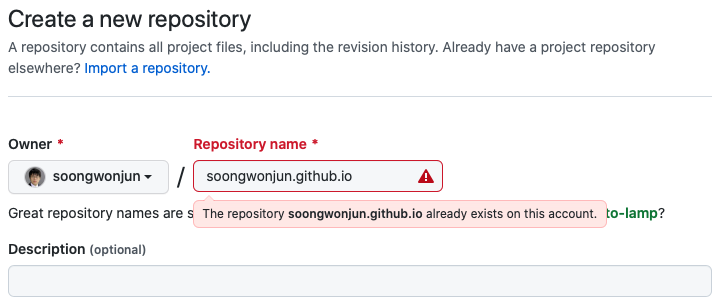
${username}.github.io로 만든다. - 다른 name이어도 되지만, 접속 테스트를 할 때 잘못 접속하는 경우가 많다.
- 아래의 스크린샷에서는 이미 blog를 만든 이후에 다시 시도하는 경우라서, repository name이 중복된다고 뜬다.
- 중복되지 않으면 녹색 표시가 뜨게 된다.
Clone your project
$ git clone <https://github.com/soongwonjun/soongwonjun.github.io>
$ git branch

- main
Install rbenv, ruby
$ brew install rbenv
$ rbenv init

# PATH를 등록하고 rbenv를 초기화한다

$ export PATH="$HOME/.rbenv/bin:$PATH"
$ eval "$(rbenv init - zsh)"
Check installable ruby version and install using rbenv
# Install ruby using rbenv

$ rbenv install -l
2.6.9
2.7.5
...

$ rbenv install 2.6.9
$ rbenv global 2.6.9
$ rbenv version -l
2.6.9 (set by /Users/sjun/.rbenv/version)
$ ruby -v
ruby 2.6.9p207 (2021-11-24 revision 67954) [x86_64-darwin19]

# Set up path and rbenv init to bashrc

$ echo 'export PATH="$HOME/.rbenv/bin:$PATH"' >> ~/.bash_profile
$ echo 'eval "$(rbenv init -)"' >> ~/.bash_profile
$ source ~/.bash_profile
Install jekyll and run using bundler
$ gem install bundler jekyll
$ jekyll new .
$ bundle exec jekyll serve
...
  Server address: <http://127.0.0.1:4000/>
  Server running... press ctrl-c to stop.
Commit & push & release
- 자신의 github repository에 commit 및 push하면 repository의 git page에서 아래와 같은 문구를 확인할 수 있다.
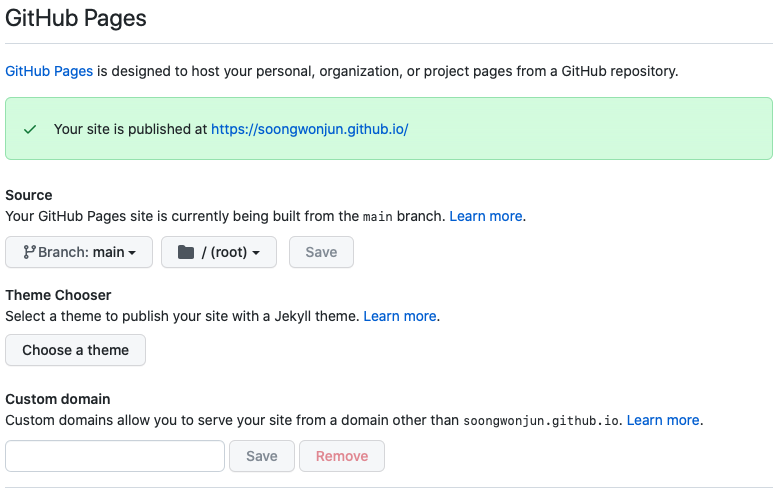
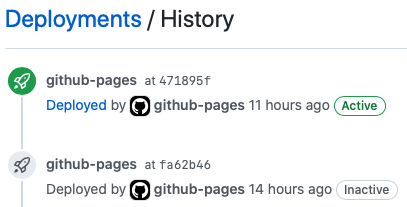
- 이후 약 10분 후에 github의 deployments 작업이 수행되며, 성공 및 실패 유무, 로그를 확인할 수 있다.
셋업 중 발생한 문제
- Permission denied 문제
$ gem install jekyll
...
ERROR: While executing gem ... (Gem::FilePermissionError)
  You don't have write permissions for the /System/Library/Frameworks/Ruby.framework/Versions/2.6/usr/lib/ruby/gems/2.6.0 directory.

# jekyll를 install하다 발생하는 에러

# path가 잘못되어 있을 경우 발생할 수 있다

# macos catalina를 사용중이었는데, 기본 설치된 2.6.3에서는 xcode관련 설정이 제대로 잘 되지 않아서, rbenv로 새로운 ruby 설치 후 진행하였음
- Push 이후 Github에서 Deployments Job이 실행되지 않을 때
- 일반적으로 Github은 push가 있어야만 Deployments Job이 실행된다.
- 다만, 이 Job이 실행되지 않을 때에는 강제로 empty commit을 만들어서 push해주면, 다시 Deployments Job이 실행되는 경우가 있다.
- 아래 명령어로 empty commit을 push할 수 있다.
git commit --allow-empty -m "chore: Empty commit"
git push
- Mac M1에서 jekyll 인스톨 중 M1 아키텍쳐와 관련 문제가 발생했을 때
자신의 컴퓨터가 MacBook이면서 M1 CPU를 사용중인 경우에는 3.x 이상의 ruby를 설치하여야 한다.
# 에러메시지
ld: symbol(s) not found for architecture arm64
clang: error: linker command failed with exit code 1 (use -v to see invocation)
make: *** [rubyeventmachine.bundle] Error 1

# 해결
$ gem install eventmachine -- --with-openssl-dir=/usr/local/opt/openssl@1.1
Reference
- Jekyll & github blog
- Github Page Manual
- Others